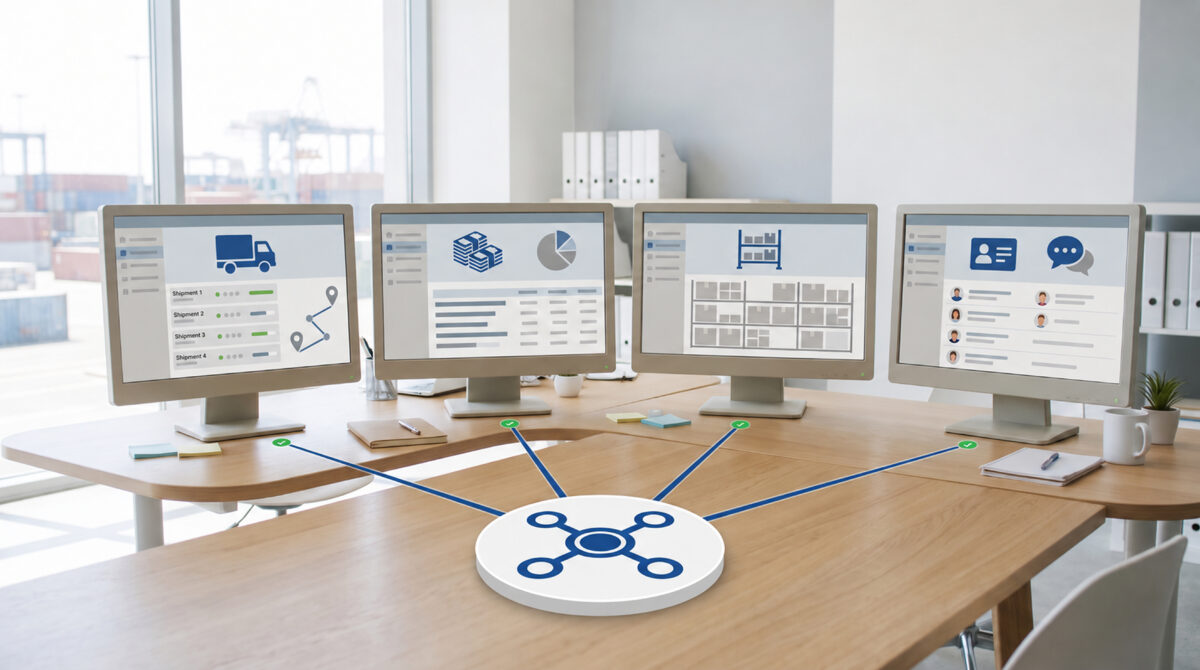
Yes. In most logistics operations, AI agents can connect with the systems a company already uses, including its TMS, ERP, WMS, CRM, carrier portals, document repositories, and email. These systems should remain the main source of operational and business records. An AI agent should work alongside them, not replace them. Its role is to gather information from different sources, understand the current situation, identify the next appropriate step within the company’s rules, and use approved interfaces to retrieve or update the relevant information systems.
It may seem simple at first, but things get more complicated when applied to a real freight operation. Customer details may be stored in the CRM, while the accepted quotation sits in a forwarding platform. Shipment activities are tracked in the TMS, warehouse information comes from the WMS, and costs and invoices are handled through the ERP. Meanwhile, carriers send status updates through APIs, EDI, online portals, or email. Important documents may even arrive through WhatsApp. A customer might request an update before all these sources show the same information.
This is where agentic AI can make a real difference in logistics. Most companies already have the software they need to manage their core operations. The real difficulty is coordinating work across those systems, especially when a single task depends on information from several applications. A properly designed AI layer can help close these gaps while keeping existing systems in control of their records. It also avoids creating another database that requires separate management or forcing the business to replace its entire technology setup.
A logistics AI agent should not create a separate version of the company’s TMS, ERP, or CRM. Each application already manages specific business information. The TMS handles shipment status and job costing, the ERP records financial transactions, the WMS tracks inventory locations and warehouse activities, and the CRM maintains customer details, account preferences, sales opportunities, and service history.
The AI agent works across these systems to bring the relevant information together. It can read records, understand emails and other unstructured messages, compare details from different sources, check company policies, prepare actions, and make approved updates. However, the final operational or financial record should remain in the application responsible for managing it.
This distinction is important when designing an agentic AI solution for logistics. The goal is not to create another database for shipment information. It is to help complete tasks that would otherwise require employees to switch between multiple applications, verify information manually, and update records one by one.
For freight forwarders, brokers, carriers, and transport teams, the TMS is often the main source of operational information. It holds shipment records, transport legs, carrier details, equipment information, milestone updates, costs, selling charges, booking details, and operational notes.
An AI agent can use this information to support everyday logistics tasks. For example, a quotation agent can retrieve a customer’s shipment requirements and compare them with approved rates. An exception-handling agent can identify delays by comparing planned milestones with the latest shipment status. A document agent can attach a bill of lading to the correct job, while a billing agent can flag delivered shipments that still have outstanding cost entries.
The TMS should remain the authoritative source for shipment records. Consider a situation where an email reports a vessel change, but the carrier’s API still shows the original booking. The agent should not update the shipment record based on the email alone. It should check which source is trusted for that type of event, verify the information where possible, and refer the discrepancy to an operations team member if the conflict remains unresolved.
This approach is particularly relevant for companies using CargoWise. In September 2026, WiseTech described CargoWise AI as using shipment and workflow context to help agents take action, retrieve missing information, and coordinate logistics tasks. Earlier 2026 materials also discussed AI applications across document processing, customs classification, compliance checks, workflow triggers, and multi-step logistics operations. These developments show how AI capabilities can be incorporated into an established forwarding platform rather than requiring companies to move their operations to a separate system.
Current example: CargoWise AI – From shipment data to intelligent action.
An ERP system provides a different set of business information. It typically manages purchase orders, supplier and customer invoices, credit limits, inventory valuation, financial records, product details, cost centers, approval workflows, and transactions between related companies.
This information becomes important when an AI agent needs to work across different business systems. For example, an agent preparing a freight quotation may need shipment details and transport rates from the TMS, along with the customer’s credit status or financial approval limit from the ERP. Similarly, an accounts payable (AP) agent might start with a carrier invoice linked to a TMS shipment, but it would need the ERP to match the invoice against the relevant records and process the financial transaction.
Microsoft’s 2026 Dynamics 365 developments offer a practical example of this approach. The company describes its Dynamics 365 ERP MCP Server as a way for AI agents to access business data and processes under defined permissions. Depending on the access granted, agents can perform tasks such as updating orders, adjusting supply plans, or initiating transfers.
The important distinction is that the AI agent does not replace the ERP. Instead, the ERP provides a controlled way for the agent to access business information and carry out approved actions within existing processes.
Current example: Microsoft – How Agentic AI Is Reshaping the Supply Chain.
SAP is following a similar direction. Its 2026 supply chain developments place Joule Assistants and AI agents within core SAP applications, allowing them to work with existing business data, connected processes, and enterprise governance controls.
SAP’s October 2026 announcements also cover a wider range of operations, including supply chain planning, manufacturing, logistics, warehousing, order fulfillment, dispatch, asset management, and supplier collaboration. However, not every announced capability is immediately available; some are scheduled for general availability later in the fourth quarter of 2026.
Current example: SAP – Joule Assistants and Agents for Supply Chain Management.
Warehouse operations follow a different set of processes from freight forwarding, but both are closely connected when it comes to moving goods. For example, a shipment may already be booked in the TMS while warehouse staff are still picking the remaining items. A truck might arrive before the outbound goods are ready for loading. In another situation, a customer could request a delivery change after the order has already been included in a picking wave.
Access to live WMS information helps an AI agent respond to these situations more accurately. Rather than assuming a load is ready because its scheduled departure time is approaching, the agent can check whether the required warehouse tasks have actually been completed. If a delay is likely, it can identify the unfinished work, determine whether the task can be given higher priority, and recommend the next step. Where permissions allow, it can also carry out the approved action.
Oracle’s Warehouse Management System offers a practical example of this approach. Its Task Management Assistant can identify orders at risk, review the related warehouse tasks, change task priorities, and assign work to warehouse users. Oracle also provides configuration options for connecting WMS with Fusion AI Agent Studio.
The principle is straightforward: the WMS continues to manage warehouse inventory and operational status, while the AI agent uses that information to assess problems, coordinate tasks, and take permitted actions. This allows warehouse and transport teams to work from the same operational picture without introducing a separate system to track warehouse activities.
Current example: Oracle WMS Task Management Assistant.
The CRM becomes valuable when an AI agent needs to consider the customer relationship, not just the shipment details. Two shipments facing the same delay may need different responses because the customers have different service agreements, delivery commitments, escalation procedures, or ongoing business opportunities.
By connecting to the CRM, an agent can review customer preferences, contact details, sales history, open opportunities, support cases, contract information, and previous communications before preparing a response or recommending an action. Once the issue has been handled, the agent can also record the outcome in the CRM, giving sales and customer service teams visibility into what happened.
Salesforce’s transportation and logistics solutions illustrate how this approach can work. Its Agentforce platform is designed to work with connected business data and support tasks such as requesting shipment tracking updates, managing changes, handling claims, and responding to invoicing or payment questions. Agents can also use workflows, automations, and APIs to carry out permitted actions across connected systems, rather than being limited to information displayed on the CRM screen.
For logistics businesses, this means an AI agent can combine shipment updates with customer history to help teams respond appropriately, follow service commitments, and keep customer records up to date.
Current example: Salesforce Transportation and Logistics CRM with Agentforce.
System integration is often seen as a matter of connecting APIs, but getting the systems to communicate is only part of the job. The bigger challenge is deciding which information to trust when the TMS, ERP, WMS, CRM, carrier systems, and email conversations provide conflicting details. Each system has a different role, so the rules must make clear which source takes precedence for each business decision.
For instance, the CRM might identify a customer as a priority account. However, that status does not give an AI agent permission to bypass a credit hold in the TMS. The WMS may confirm that an order has been picked, while the TMS still has no confirmed vehicle for the shipment. The ERP might show a supplier invoice as posted even though the forwarding job remains open. Similarly, the ETA provided by a carrier’s API may differ from the estimate generated by a shipment visibility platform.
To manage these situations, a production-ready implementation needs a clear source-of-truth map. This map defines which system owns each type of business record, which information other systems can contribute, and how the agent should respond when the records do not match. Depending on the situation, the agent may need to verify the information, follow a defined priority rule, or escalate the issue to a human for review.
Without these rules, an agent could make decisions based on incorrect or incomplete information. With them, it can coordinate work across systems while respecting existing business controls and approval processes.
· Shipment execution state: normally the TMS or forwarding platform.
· Posted accounting and financial balances: normally the ERP.
· Physical inventory and warehouse task state: normally the WMS.
· Customer and opportunity context: normally the CRM.
· Carrier-confirmed booking or milestone: the carrier or approved transport data source.
· Prediction: a model output that should remain labelled as a prediction, not rewritten as a fact.
· Unstructured email or WhatsApp message: evidence that may require validation before changing an authoritative record.
The rules for deciding which system takes priority will differ from one company to another. The important thing is to define those rules clearly. Without them, an AI agent working across multiple systems can spread incorrect information quickly instead of helping teams maintain accurate and consistent records.
One way to integrate AI into logistics is to use agents built into existing enterprise software. Platforms such as CargoWise, Microsoft Dynamics 365, SAP, Oracle, and Salesforce are developing AI capabilities that work within their own systems. These agents can use the platform’s data structures, access permissions, and established workflows to carry out tasks.
The main advantage is that the agent can operate within existing business rules and security controls while using information specific to that application. However, its reach may be limited to the system in which it operates. For example, an AI agent built into a warehouse management system (WMS) may handle picking, inventory, and warehouse tasks effectively, but it may still need integrations to communicate with a separate transport management system (TMS), CRM, carrier network, or document management platform.
A custom AI agent can connect to several business applications through their APIs, allowing it to coordinate work across different systems. This approach is useful for logistics companies that use a mix of software platforms or need to manage processes that span multiple applications.
For example, an agent handling shipment exceptions could check shipment details in the TMS, review customer commitments in the CRM, confirm warehouse readiness through the WMS, and retrieve tracking updates from a carrier’s visibility API. Based on the information collected, it could prepare a customer notification, create a task for the operations team, or recommend the next step.
However, connecting these systems requires more than making individual API calls. The integration layer must manage authentication, API rate limits, retries, data formats, error handling, software version changes, and audit logs. These requirements help keep communication between systems reliable and make the agent’s actions traceable.
For a production deployment, the custom integration layer should be designed as a managed part of the company’s enterprise architecture, with consistent security, monitoring, and error-handling practices across all connected systems.
For logistics businesses handling large volumes of transactions, it is often more effective to connect AI agents through an integration layer that delivers events as they occur, rather than having agents repeatedly check every system for updates. Events such as a shipment being created, a booking being confirmed, a warehouse order being released, an ETA changing, a delivery being completed, an invoice being posted, or a customer case being opened can automatically trigger the relevant agent workflow.
This approach reduces the number of direct connections between individual systems and provides a central place to manage message formats, authentication, data transformation, and transaction logs. With these integration tasks handled centrally, the AI agent can focus on understanding the situation, evaluating available information, and deciding what action to recommend or take within its permissions.
This architecture becomes particularly useful when a logistics company operates multiple ERP instances, regional TMS platforms, separate WMS solutions, or systems inherited through acquisitions. Instead of building the entire integration process into the AI agent, the company can use a dedicated integration layer to manage communication between applications. The agent then works with consistent, structured information without becoming the middleware responsible for keeping the entire technology environment connected.
Some logistics systems and external portals do not provide APIs for all the actions a business needs. In such cases, controlled robotic process automation (RPA) or browser automation can help connect these systems and complete tasks through their existing user interfaces.
The AI agent can identify when a booking needs to be changed and pass the approved details to an RPA bot. The bot then enters those details into the existing legacy application by following a predefined sequence of steps. Keeping the decision-making separate from screen-based execution helps reduce errors, especially when the application’s interface changes.
RPA is best treated as one of the tools an AI agent can use, rather than an alternative to the overall integration architecture. The agent manages the business context and coordinates the workflow, while the bot carries out specific, predefined actions when required.
Imagine a customer emails a logistics company asking for a delivery to be moved forward by one day. An effective AI agent does more than summarize the request and leave an employee to investigate. It checks the relevant systems to determine whether the change is possible.
The first step is to identify the customer and shipment. The CRM provides the account details, contact information, service commitments, and commercial history. The TMS shows the planned transport, assigned carrier, route, and shipment milestones. The WMS confirms whether the order has been picked and whether the warehouse can prepare it for an earlier departure. The ERP helps identify any credit or financial holds that could prevent the order from being released.
With this information, the agent can assess the available options. If the warehouse can prepare the goods in time and the carrier has an earlier slot, the agent checks whether the revised plan falls within the company’s approved service conditions and cost limits. If it does, the agent can prepare the necessary TMS changes and draft a response to the customer. If the change involves an unapproved premium charge or would reduce the shipment’s margin beyond the permitted limit, the request is referred to an operations specialist or commercial manager for approval.
Once the change is approved, the agent carries out the actions permitted by its access rules and verifies that the updates have been completed successfully. The CRM retains the customer communication, the TMS records the revised transport plan, and the WMS continues to reflect the actual warehouse and fulfillment status.
This is what agentic integration looks like in practice. The company does not need to replace its existing systems. Instead, the AI agent coordinates information and actions across them, reducing the manual checks, repeated data entry, and handoffs that can slow down a routine customer request.
One common mistake when building an AI agent is transferring too much business data into the agent platform. An agent needs enough information to understand a task and make decisions, but that does not mean it needs a complete copy of every database used by the company.
For live operational information, retrieving data directly from the relevant system is often the better approach. When needed, the agent can request the latest shipment status, order details, inventory levels, or customer records through an approved interface. This helps avoid outdated copies and keeps responsibility for each record with the system that manages it.
However, some information may be worth storing in an indexed or cached format for faster access. Examples include standard operating procedures (SOPs), contracts, freight tariffs, customer instructions, carrier rules, historical email conversations, and product documentation. These resources can help the agent find relevant information without repeatedly retrieving the same documents. The stored information should retain links to its source, version details, freshness indicators, and the appropriate access permissions.
Microsoft is developing ways for AI agents to access ERP data and business processes through controlled, permission-based interfaces, rather than maintaining a separate copy of the ERP database. Salesforce follows a similar approach, allowing agents to work with real-time business information and perform permitted actions across connected systems.
The principle applies to logistics businesses as well: provide the agent with the information it needs to complete a task, but keep official business transactions and records in the systems responsible for managing them.
Freight operations rarely rely on a single reference number across every business system. The CRM has account and opportunity IDs, while the TMS uses job or shipment numbers. Carriers maintain their own booking references. Ocean freight uses container and bill-of-lading numbers, while air freight relies on house and master air waybill numbers. The ERP tracks invoices and vendor IDs, and the WMS manages warehouse orders, picking waves, license plates, and task references.
Before taking action, the AI agent must confirm which records belong to the same customer, shipment, order, or transaction. Matching records based on similar names or descriptions may be useful when searching for information, but it is too risky for important tasks such as posting a supplier invoice or changing a shipment booking.
The system should use exact, verified identifiers whenever possible. If those identifiers are unavailable, AI-based matching can help identify potential connections, but uncertain matches should be sent to a human for review. Once a match is confirmed, the relationship should be saved so the agent can reuse it for future updates instead of repeating the matching process each time.
A capable AI model does not need unrestricted access to business systems. Its permissions should depend on the specific tasks it is authorized to perform.
For example, an agent may be allowed to check a customer’s credit status without changing the credit limit. A quotation agent might create a draft in the TMS but require approval before accepting a margin exception. A warehouse agent could change task priorities without altering order quantities, while a CRM agent might send routine shipment updates but lack authority to promise compensation.
A safer approach is to assign each agent a dedicated service identity with access limited to approved actions. Every important system call should be logged for accountability and review. Agents should use their own authorized credentials rather than relying on the personal login details of employees.
Reliable AI agents depend on ordinary integration engineering, not just good decision-making. Even when an agent reaches the right conclusion, the workflow can still break if an API times out, an access token expires, a record is locked, or the receiving system rejects a request.
The workflow should track each action through clearly defined stages, such as prepared, submitted, acknowledged, failed, retrying, escalated, and completed. Sending a request does not guarantee that the intended business operation has succeeded, so the system must verify the outcome before proceeding.
Where possible, write operations should also be designed to prevent duplicate actions during retries. For example, if a carrier booking request times out, the system should first check whether the carrier has already created the booking. Otherwise, retrying the request could create duplicate jobs, send the same message repeatedly, or process a financial transaction twice.
This is why successful AI implementation requires strong integration engineering projects alongside the development and deployment of the model.
Conflicting information across logistics systems is common. The solution is not to let the AI model choose whichever answer seems most convincing.
For example, the TMS may show an ETA of 18 October, while the carrier API reports 20 October and a shipment visibility platform predicts 21 October. Meanwhile, the destination agent’s latest email may suggest that delivery will probably happen on the 19th. These dates are not necessarily equivalent: one may be a system-recorded estimate, another a carrier-confirmed update, and another a prediction or informal opinion.
A reliable agent should retain the source and context of each value. It can report that the carrier’s confirmed ETA is 20 October, the visibility platform predicts 21 October, and the destination agent expects delivery on the 19th. Defined business rules can then determine which value should update the TMS, which information the operations team should review, and what should be communicated to the customer.
The same approach applies to financial records and warehouse operations. When systems disagree, the agent should flag the discrepancy, explain where the information came from, and follow the established resolution process. It should never combine conflicting data into a single answer without a valid basis.
An AI agent connected to four enterprise applications can pose greater security risks than a chatbot that only reads from one knowledge base. If something goes wrong, the impact may extend across several systems rather than remain confined to a single source. Businesses need to secure these connections with proper identity checks, clearly defined access permissions, network security, data protection, and detailed audit logs. These controls help ensure that the agent can access only what it needs and that every action can be reviewed when necessary.
· Use dedicated agent or service identities rather than shared employee credentials.
· Grant least-privilege access at the action level.
· Separate read permissions from write permissions.
· Require approval for high-impact or irreversible actions.
· Log source data, reasoning context, requested action, system response, and final outcome.
· Protect secrets and tokens outside prompts and normal model context.
· Apply customer, entity, region, and role access rules consistently across retrieved data.
· Treat email, attachments, web pages, and other external content as potentially untrusted input.
· Provide a safe mode in which the agent can observe and recommend but cannot execute writes.
· Make it possible to disable a failing integration without shutting down the entire workflow.
These safeguards are essential, not just extra security measures. They help businesses move an AI agent beyond simple assistance and give it the ability to handle operational tasks reliably, with clear limits, accountability, and proper oversight.
Many logistics companies use systems with different levels of integration. One platform may offer well-developed APIs, while another relies on scheduled data exports. Some carrier portals may not provide any practical integration options.
A better approach is to assess each integration based on its business importance and the risks involved. Frequent, high-impact operations need reliable interfaces that support secure and consistent updates. For simpler tasks, such as retrieving information, scheduled data exports or periodic checks may be sufficient. Automated interaction with legacy screens can also help when other options are unavailable, but a stable API or event feed is usually preferable.
A pilot can start by connecting only the systems needed for the initial task. For example, a shipment exception agent could first collect data from the TMS and carrier systems, then draft CRM entries and customer updates for review and approval. After access permissions, data source priorities, and workflow safeguards have been tested in practice, the agent can gradually be allowed to make approved updates itself.
Neither option is the best choice for every business process. Embedded agents work best when most of the work happens within a single platform. They can use the application’s existing data, permissions, and workflows. For example, an agent built into a warehouse management system (WMS) can handle tasks related to inventory and warehouse operations.
A custom cross-system agent is more useful when a workflow involves several applications. Consider a freight forwarder’s inquiry-to-quote process. It may require information from Outlook or Gmail, a CRM, a TMS, carrier rate sources, customer pricing rules, and approval channels. Since no single application manages the entire process, a custom agent can coordinate the steps and keep information moving between systems.
In many enterprises, both approaches can work together. Native agents handle specialized tasks within their respective platforms, while an orchestration layer manages the wider business process. SAP’s 2026 direction follows a similar approach, with AI assistants coordinating work across business functions and specialized agents performing tasks using the business context available within core applications.
The technology stack may differ from one business to another, but a production-ready AI agent needs more than a language model and a few API connections. It also requires reliable workflow management, secure access controls, data validation, error handling, and monitoring to operate safely across enterprise systems.
· Trigger and event layer: email, message, shipment event, order change, warehouse event, document arrival, or scheduled check.
· Identity and entity-resolution layer: shipment, customer, carrier, order, invoice, container, AWB, BL, PO, or warehouse task mapping.
· Context layer: current state retrieved from TMS, ERP, WMS, CRM, documents, and partner systems.
· AI understanding layer: interpretation of unstructured communication, documents, intent, and exception context.
· Deterministic policy layer: margins, credit, eligibility, approvals, financial thresholds, compliance, and customer-specific rules.
· Orchestration layer: decides which tool or workflow step is required next.
· Action layer: platform APIs, workflow actions, integration middleware, email/WhatsApp, carrier APIs, and controlled RPA.
· Approval layer: routes sensitive actions to the accountable person and resumes after the decision.
· Audit and observability layer: records inputs, actions, responses, exceptions, model/version information, and completion state.
· Recovery layer: retries, timeouts, duplicate prevention, compensation or rollback where feasible, and safe/manual mode.
The LLM is just one component of the overall architecture. Reliable AI agents also depend on integration services, workflow orchestration, access controls, data validation, and monitoring to function effectively in a production environment.
Start by identifying the systems involved in the workflow and deciding which system is responsible for each key piece of information. Rather than connecting every application at once, focus on a specific business process and identify the minimum number of systems needed to complete it. This keeps the initial implementation manageable and makes it easier to test, monitor, and improve the agent before expanding its access.
Give the agent controlled access to the records it needs and check whether it can identify the right records, retrieve up-to-date information, and follow the correct order of trusted data sources. Make sure it can recognize conflicting information and present those differences clearly. At this stage, the agent should focus on reviewing data, summarizing findings, and recommending next steps rather than making changes to business systems.
Allow the agent to draft updates for the TMS, ERP, warehouse system, or CRM, along with carrier requests and customer messages. A user reviews and approves each action before it is carried out. This helps uncover data mapping issues, incorrect fields, and workflow errors before the agent is allowed to make changes independently.
Allow the agent to carry out low-risk actions automatically when the tasks are clearly defined and can be reversed if something goes wrong. These might include updating shipment statuses, attaching classified documents, creating follow-up tasks, or changing approved reference fields. Even when actions run without human approval, each one should be recorded and checked to confirm that it was completed correctly.
Once the agent has demonstrated that identity checks, access permissions, business rules, and error recovery work reliably, it can take on more steps across the end-to-end workflow. However, actions that carry significant financial, operational, or compliance risks can continue to require human approval, even as the agent becomes more capable.
Cross-system access should not automatically give an AI agent the freedom to act across every connected system. When a decision carries greater financial, operational, or compliance risk, human approval becomes more important.
In freight and logistics, certain decisions should remain under human control. These include unclear customs classifications, questions about dangerous goods, sanctions and compliance checks, onboarding unfamiliar carriers, major margin exceptions, expensive shipment recovery, changes to contractual terms, claims settlements, significant customer compensation, and updates to payment details. In these situations, getting the decision right matters more than simply acting quickly.
An AI agent can still save considerable time without making the final decision. It can collect the relevant records, flag conflicting information across systems, outline the available options, and present the findings for review. The responsible person can then make an informed decision without spending hours gathering the details manually. That is practical automation: less investigation, faster approvals, and human oversight where it matters most.
A successful project integration is about more than connecting an AI agent to existing software. Its real value lies in reducing manual handoffs, avoiding unnecessary delays, and ensuring tasks are completed accurately and consistently.
· Human system switches per case
· Manual data re-entry minutes
· Time from trigger to completed system update
· Percentage of cases completed without unplanned manual intervention
· Integration failure rate by system
· Retry and duplicate-action rate
· Identity-match exception rate
· Number of conflicting-source exceptions
· TMS or ERP write rejection rate
· Average human approval time
· Customer response time
· Shipment exception resolution time
· Invoice or document rework rate
· Percentage of agent actions successfully verified after execution
The most useful measure is often how reliably the entire workflow runs from start to finish. An AI agent may complete tasks quickly, but if its work leads to data mismatches, errors, or extra reconciliation later, it has not made the operation more efficient.
When an AI agent connects to each business application through a separate, custom-built connection, it can introduce the same integration problems the company was trying to avoid. Over time, these connections become harder to maintain, troubleshoot, and update as systems change. To prevent this, businesses should establish a consistent approach to authentication, data formats, event handling, and system monitoring before expanding the agent across multiple applications.
AI agents need access to the right information to do their jobs, but that doesn’t mean every enterprise database should be copied into a separate AI layer. Duplicating large amounts of data can leave the agent working with outdated records, increase security risks, and make it harder to identify which system holds the authoritative information. A more practical approach is to give agents controlled access to the data they need while keeping ownership and updates within the original business systems.
When data from different systems conflicts, the business needs clear rules for deciding which source to trust. An AI model can identify inconsistencies and help assess the available information, but the company must establish which system takes precedence for each data field and business decision.
This goes against the principle of least privilege. Give the agent only the read and write access it needs to handle its current tasks. Broaden those permissions only when a demonstrated workflow requirement justifies the change.
If the system cannot consistently match a shipment, customer, order, invoice, or warehouse task to the correct record, it should not be allowed to make changes to that record automatically.
An extraction model may identify the right information, yet the ERP update can still fail. Likewise, an AI model may select the correct action, but the carrier’s API may reject the request. What matters is whether the task is completed successfully, not just how accurately the model performs.
· Which system will remain the source of truth for each business object?
· How will you map shipment, order, customer, carrier, invoice, and warehouse identities across systems?
· Do you use native APIs, MCP-style connectors, integration middleware, event streams, or RPA for each action?
· How are agent identities and permissions managed?
· Can read and write permissions be separated?
· How do you prevent duplicate writes when an API call times out?
· What happens if the TMS update succeeds but the CRM update fails?
· How do you preserve provenance when two systems disagree?
· Which rules remain deterministic outside the model?
· How are high-risk actions routed for approval?
· Can the agent resume correctly after approval or a delayed external response?
· Can every write be traced back to the source data, rule, user approval, and system response?
· How do you test integrations against production-like data before enabling writes?
· What is the safe-mode or kill-switch design?
· How do you handle a platform API change without breaking the entire workflow?
Yes, integration is possible, but the approach depends on the customer’s CargoWise setup, available interfaces, workflow requirements, and access permissions. As CargoWise continues to develop its own AI capabilities, custom agents should use supported integration methods and work within existing processes, with CargoWise remaining the system of record for operational data.
Yes. Microsoft and SAP are expanding their ERP platforms with AI agents that can access business data and perform approved tasks within defined permissions. Microsoft supports agent-driven actions across Dynamics 365 workflows, while SAP is integrating AI assistants and agents into its enterprise and supply-chain applications. Businesses can also connect custom agents through approved APIs and middleware, while retaining existing security controls and approval processes.
Yes. Oracle offers AI-agent capabilities within its Warehouse Management System (WMS). Its Task Management Assistant can help identify orders at risk of delay, review warehouse tasks, adjust priorities, and assign work. Oracle also supports WMS integration with Fusion AI Agent Studio, allowing businesses to explore agent-based workflows within their existing systems.
Yes. Salesforce’s Agentforce supports AI-driven workflows for transportation and logistics, supporting workflows such as shipment tracking, shipment updates, claims, invoicing, and payment inquiries using connected customer data. Businesses can also integrate custom AI agents through supported CRM APIs to coordinate work across Salesforce and external systems, including TMS and ERP platforms, while maintaining appropriate access controls and approval processes.
In most cases, AI agents do not need direct database access. Using supported APIs, application services, event interfaces, or managed integration layers allows them to retrieve information and perform approved actions while preserving existing business rules and access controls. Direct database access can bypass application-level validation and increase the risk of inconsistent or incorrect records.
If a TMS does not support modern APIs, businesses can connect AI agents through controlled RPA, scheduled file exchanges, EDI, approved database views, or other supported interfaces. These methods can involve higher maintenance costs and integration risks, so any action that changes operational records should be thoroughly tested and protected by appropriate permissions, validation checks, and approval controls.
A single AI agent can technically connect to all four systems, but giving it unrestricted access is rarely a good design choice. Complex workflows often benefit from separate capabilities and clearly defined permissions. For instance, a customer-service agent may need to check shipment updates and customer records without having the authority to approve payments or change warehouse inventory. This keeps access limited to what each task requires while allowing the agent to coordinate work across systems.
AI agents should avoid unnecessary data duplication. The TMS and ERP should remain the authoritative sources for their respective transactions. An agent can cache or index selected information to speed up processing or retrieve relevant context, but any stored copy should retain its source, be checked for freshness, and follow the same access controls as the original data.
The workflow architecture should define which system the AI agent can update for each type of activity. Shipment execution changes belong in the system that manages transport operations, financial postings go to the ERP, warehouse activities are handled by the WMS, and customer interactions are recorded in the CRM. The agent should follow these predefined rules rather than decide on its own which system owns a record or where a change should be made.
AI agents can update business systems automatically for approved, low-risk tasks once the workflow has proven reliable and appropriate permissions, validation rules, and error-recovery measures are in place. However, high-impact or irreversible actions such as financial postings, significant shipment changes, or sensitive inventory adjustments should require human approval.
In many cases, particularly in larger business environments, integration platforms are still necessary. AI agents do not replace core integration functions such as authentication, data format conversion, event processing, API management, monitoring, and transaction reliability. A well-designed integration layer helps keep AI-driven workflows secure, reliable, and easier to maintain.
A company does not necessarily need to replace its TMS to adopt agentic AI. If the existing system can provide the required data and support the necessary actions through available interfaces, AI agents can often be integrated around it. A TMS replacement should be considered only when the system has wider functional or technical limitations, not simply because the company wants to introduce AI. The next blog in this series explores when replacing a TMS may be necessary.
AI agents can integrate with a company’s existing logistics systems, which is often the most practical way to get value from them. Systems such as the TMS, ERP, WMS, and CRM already hold the business data, operational rules, and records agents need to carry out tasks effectively.
The real challenge goes beyond connecting an AI model to a few APIs. The real challenge is making these connections work reliably in day-to-day operations. That means matching records correctly across systems, defining which source to trust, controlling access, enforcing business rules, protecting transactions, setting clear approval processes, maintaining audit trails, and handling situations where a system fails or provides conflicting information.
With the right foundations in place, AI agents can reduce much of the manual work involved in switching between business applications. Instead of an employee reading an email, checking the CRM and TMS, contacting the warehouse, reviewing the ERP, and then responding to the customer, an agent can bring the relevant information together and prepare or carry out approved actions. Human involvement remains necessary when a decision requires judgment or falls outside the agreed rules.
The real opportunity is not to replace a company’s existing enterprise systems but to connect them so they work together as part of a single, coordinated business workflow.
aTeam Soft Solutions develops custom agentic AI and enterprise automation solutions for logistics, freight forwarding, transportation, trading, distribution, and supply-chain businesses. Our solutions cover freight quotation, document processing, shipment exception handling, supplier ETD monitoring, customs preparation, dispatch, fleet management, accounts payable, and demand planning. We also integrate AI workflows with existing TMS, ERP, CRM, and WMS platforms, as well as email, WhatsApp, carrier systems, APIs, and legacy applications.
Our approach to the AI model is to retain the client’s existing systems as the authoritative source of business records and build a controlled AI orchestration layer around them. Agent permissions are expanded gradually as the workflows prove reliable. This allows businesses to maintain control over their data, approvals, and critical decisions while AI agents handle repetitive tasks and coordination across systems.