NEWBuilt for UAE & GCC hospitals · AI hosted in UAE North

AI Automated Nurse Scheduling for Hospitals

AI AUTO-FILL · AUGUSTRoster ready to publish
✓
August roster published98 shifts · 0 rule breaches · 342 nurses notified

The AI builds next month's roster in minutes. A rules engine checks every assignment against licences, rest, hours and ward policy. Your charge nurse reviews and publishes. Your CNO sees every ward, every shift, in 26 reports.

Built around the rules your hospital is held to

DHA licensingDoH Abu DhabiMOHAPUAE PDPLFederal Decree-Law 33/2021Art. 17 Ramadan hoursArt. 19 OvertimeArt. 29 Annual leaveArt. 31 Sick leaveIn-country data residencyEnglish · العربية
The solution

What Is NurseRoster AI?

One system that turns your hospital's data into a safe, published nurse roster.

Your hospital data
Bed census87% occupied
FALMSR+
Nurses & skills342 on registry
DHA✓
Licences & certsExpiry dates tracked
Leave & labour law48h cap · 12h rest
1
AI drafts the roster
2
Rules engine checks every shift
LicenceCertsSkill48hRestLeaveGender1/dayShift
3
Charge nurse approves
✓ Published
What you get
Safe rosterBuilt in minutes
● Licence expired● ICU night short
Early warningsBefore shifts are worked
CNO reports26 live reports
The problem

The Problem Every Nursing Director Faces

Behind every nurse staffing crisis is a manual process that was never designed for the complexity of modern hospitals.

2–4 days
01 · Time

Building the monthly roster takes days of a senior nurse's time

Built by hand, every month.

Sara K.52h / week
Omar R.40h
Lina M.8h rest
02 · Memory

Safety rules are checked from memory, so unsafe shifts slip through

Nothing blocks an unsafe cell.

DHA licenceEXPIRED
03 · Expiry

Expired licences are found after the nurse has already worked

After the shifts were worked.

✓ BLS
✓ ACLS
PALS · never held
04 · Visibility

Nobody can see which required certificates a nurse never had

No row, so no warning.

?
05 · Coverage

Leave is approved without knowing if the shift will stay safe

Will night shift stay safe?

OT 2.5hSigned by: ?
06 · Payroll

Overtime is written on paper and retyped into payroll

Retyped into payroll.

Building fill-rate report… day 5
07 · Reporting

Every staffing report takes a week to put together by hand

A week for one snapshot.

ICU · Night 14who?
Sara K. assignedwhy?
08 · Audit

There is no record to show a regulator why a nurse was on a shift

Nobody knows why.

How it works

How Automated Nurse Scheduling Works

From raw hospital data to a published roster, in six steps. The system fits into the way nursing leadership already works.

Step 1 of 6

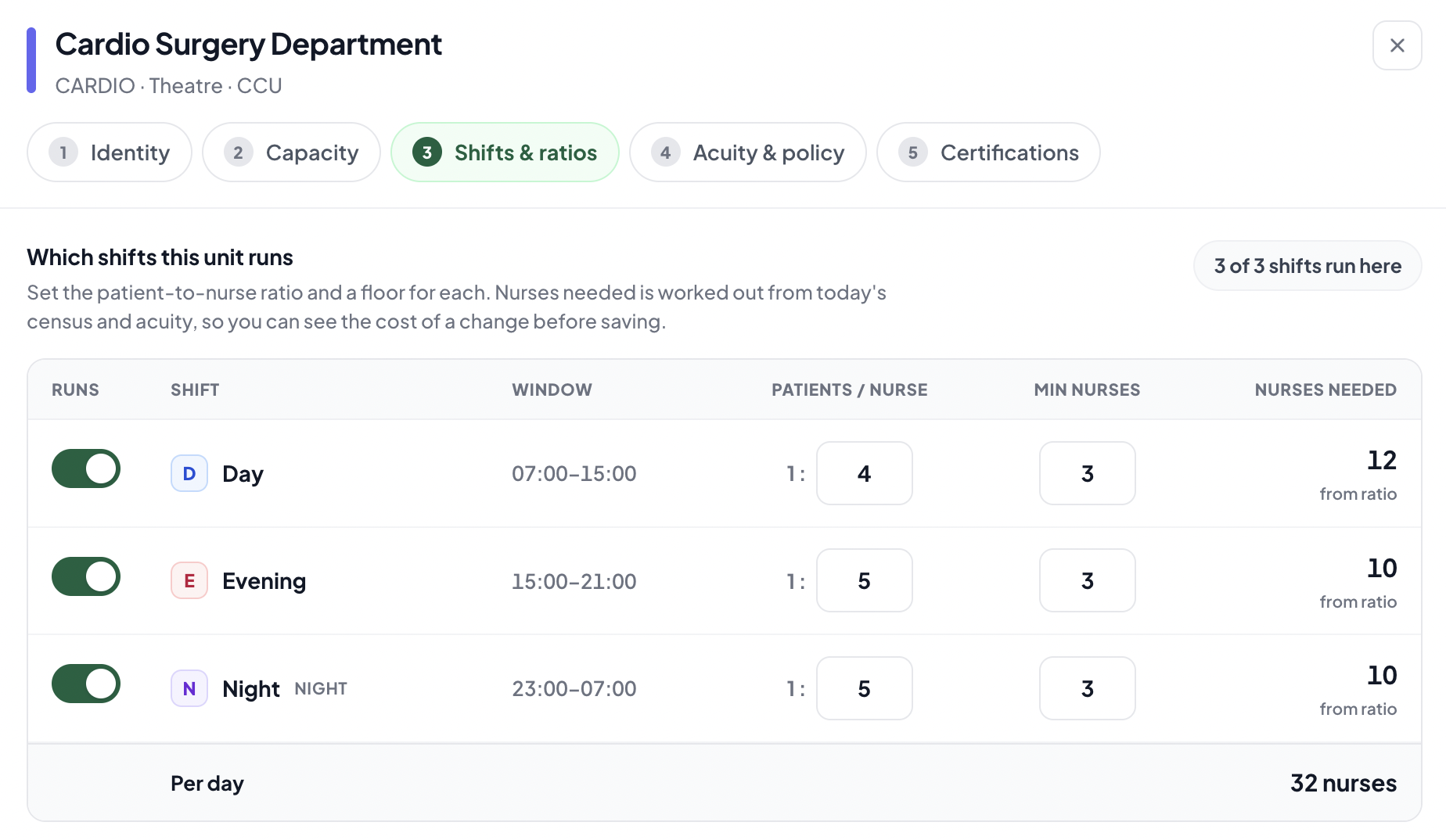
Tell the system how each ward is staffed, just once

Set ratios, minimum staff, required certificates and shift patterns per ward.
  • Ratios per shift
  • Required certs
  • Gender policy
Unit configuration: shifts and patient-to-nurse ratios for Cardio Surgery
Unit Configuration
Step 2 of 6

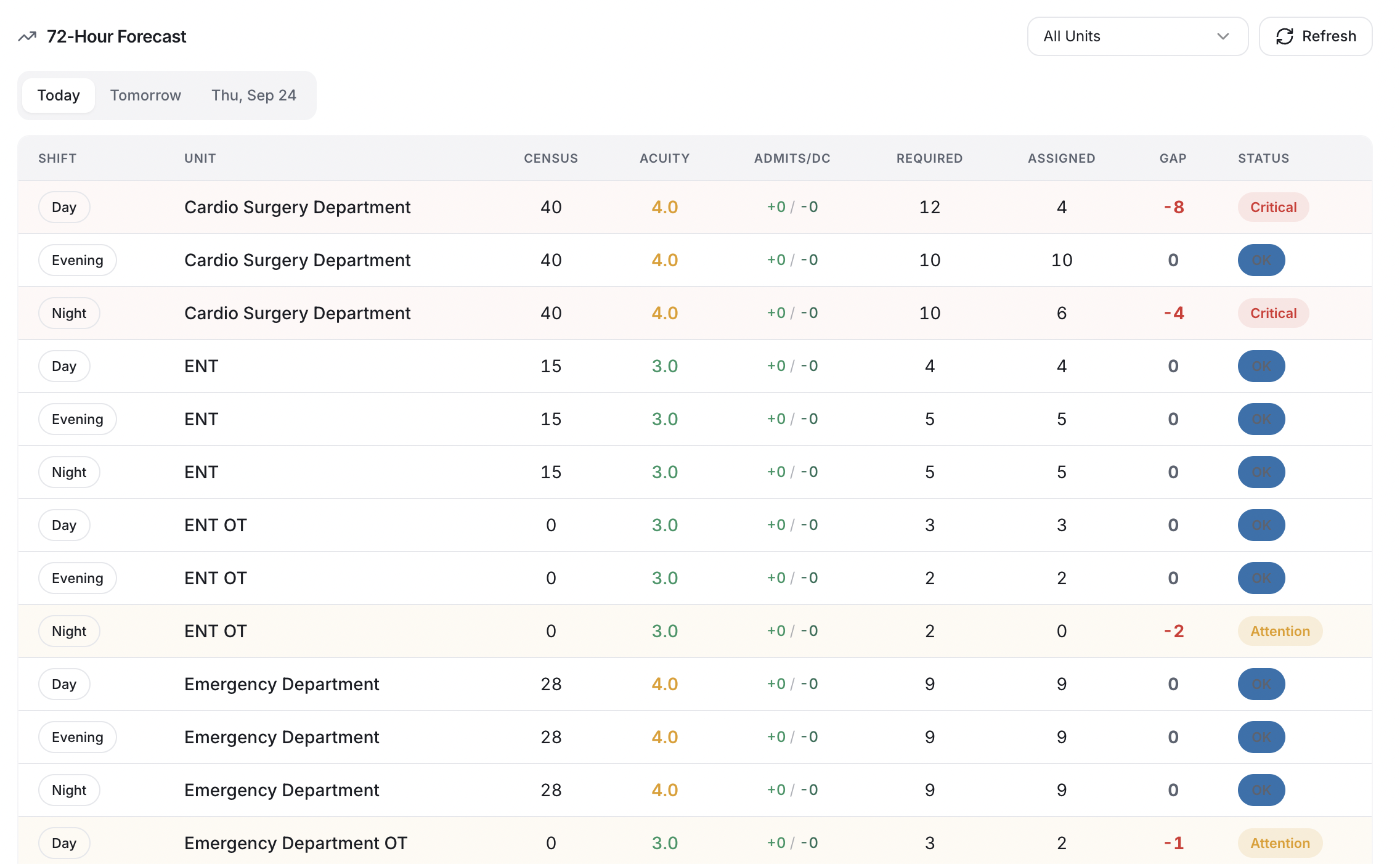
The system works out how many nurses each shift needs

Census and acuity calculate how many nurses every shift needs.
  • Census × acuity
  • 72-hour forecast
  • Gaps flagged
72-hour staffing forecast by unit and shift with census, acuity, required and gap
72-hour forecast
Step 3 of 6

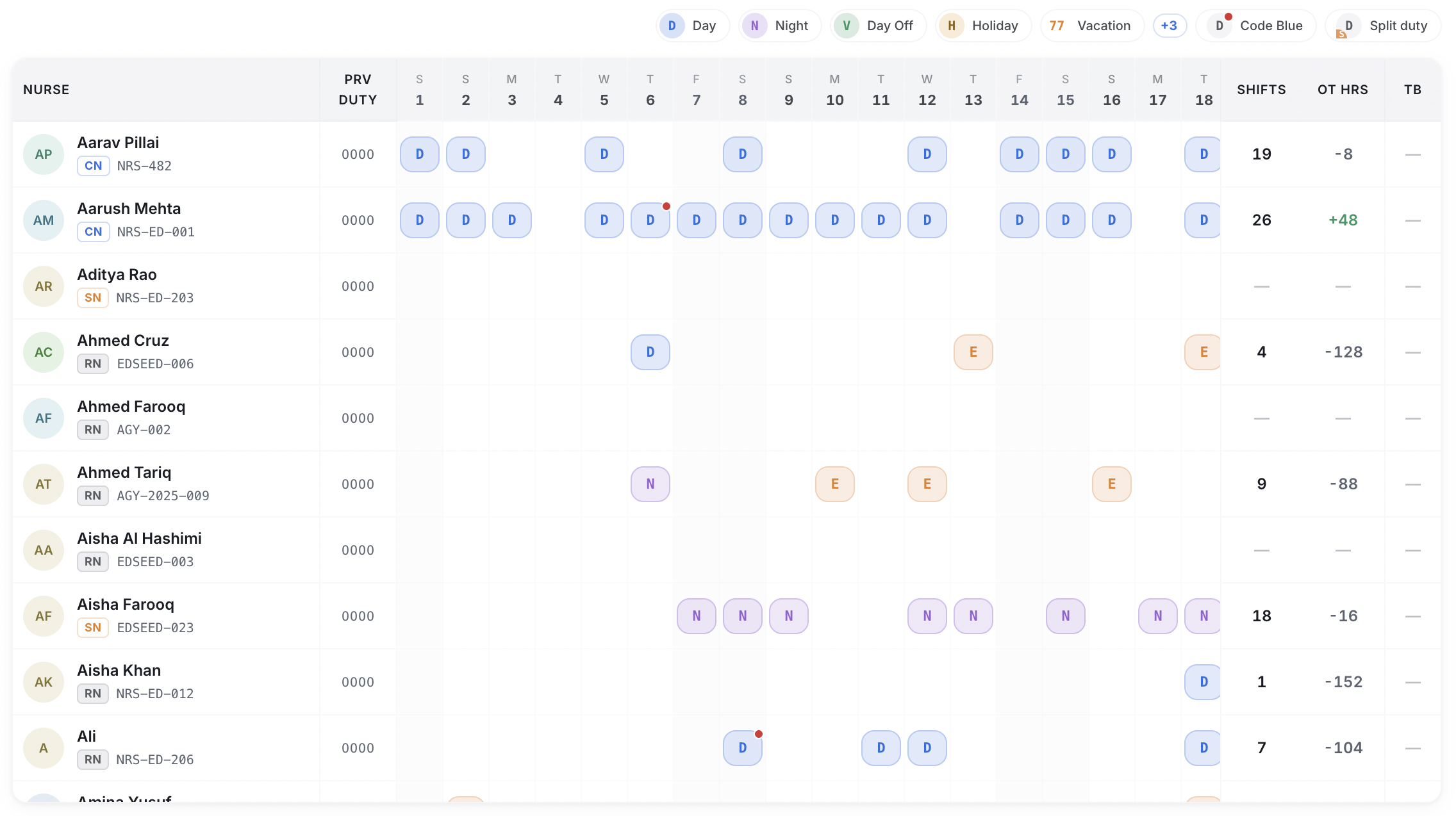
AI creates the full roster for you in minutes

AI builds the month. The rules engine checks every shift and fills any gaps.
  • Day, week or month
  • 9 safety gates
  • Fair hours
Smart Roster grid of day and night shifts generated by AI auto-fill
Smart Roster
Step 4 of 6

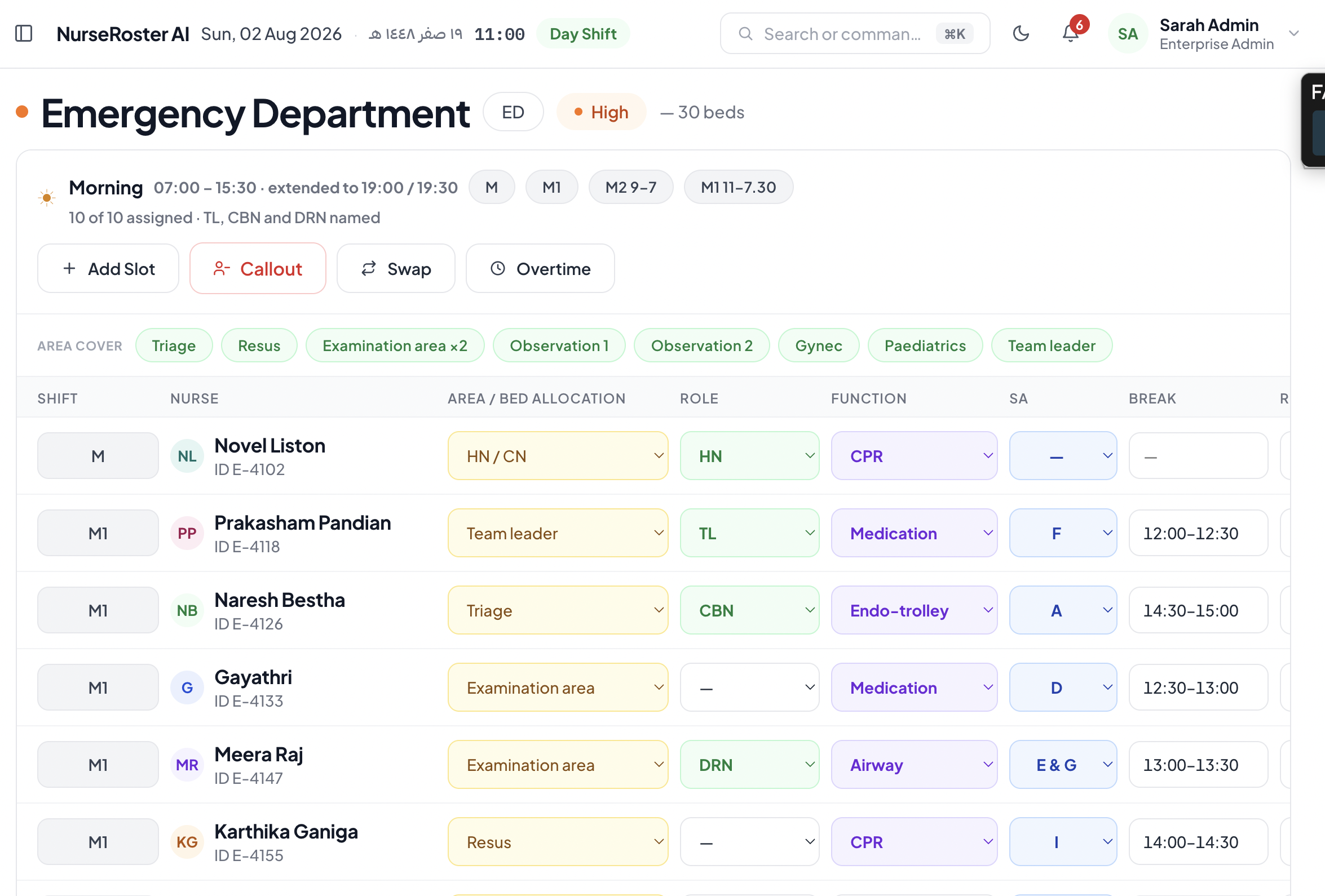
Your charge nurse checks it, makes changes and publishes

Adjust, swap or float staff, then publish and print the daily sheet.
  • Swap & float
  • Code Blue tags
  • Print-ready sheet
Daily assignment sheet for Emergency Department with area, role and function per nurse
Daily assignment sheet
Step 5 of 6

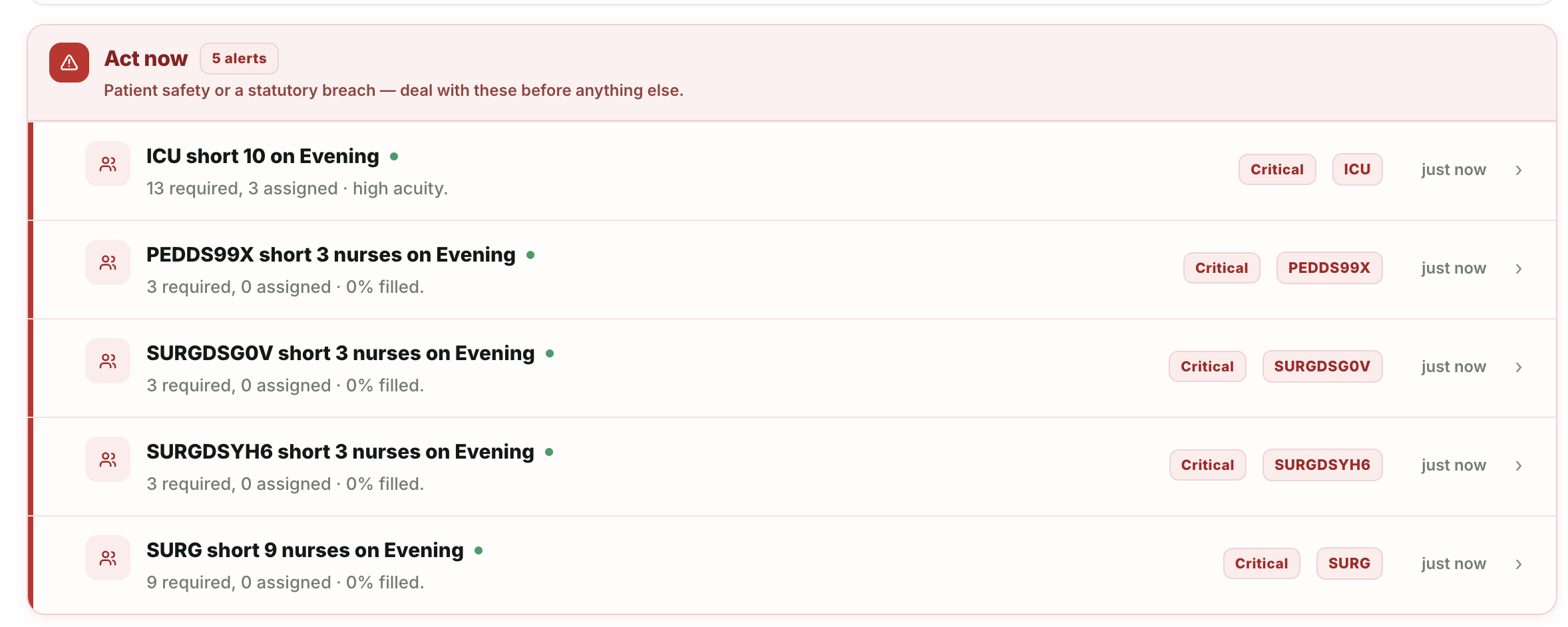
Sick calls, leave and overtime are handled in the same system

Ranked replacements for callouts. Two-stage approval for leave and overtime.
  • Ranked cover
  • Leave approval
  • OT approval
Act now alerts showing wards short of nurses on the evening shift
Alerts
Step 6 of 6

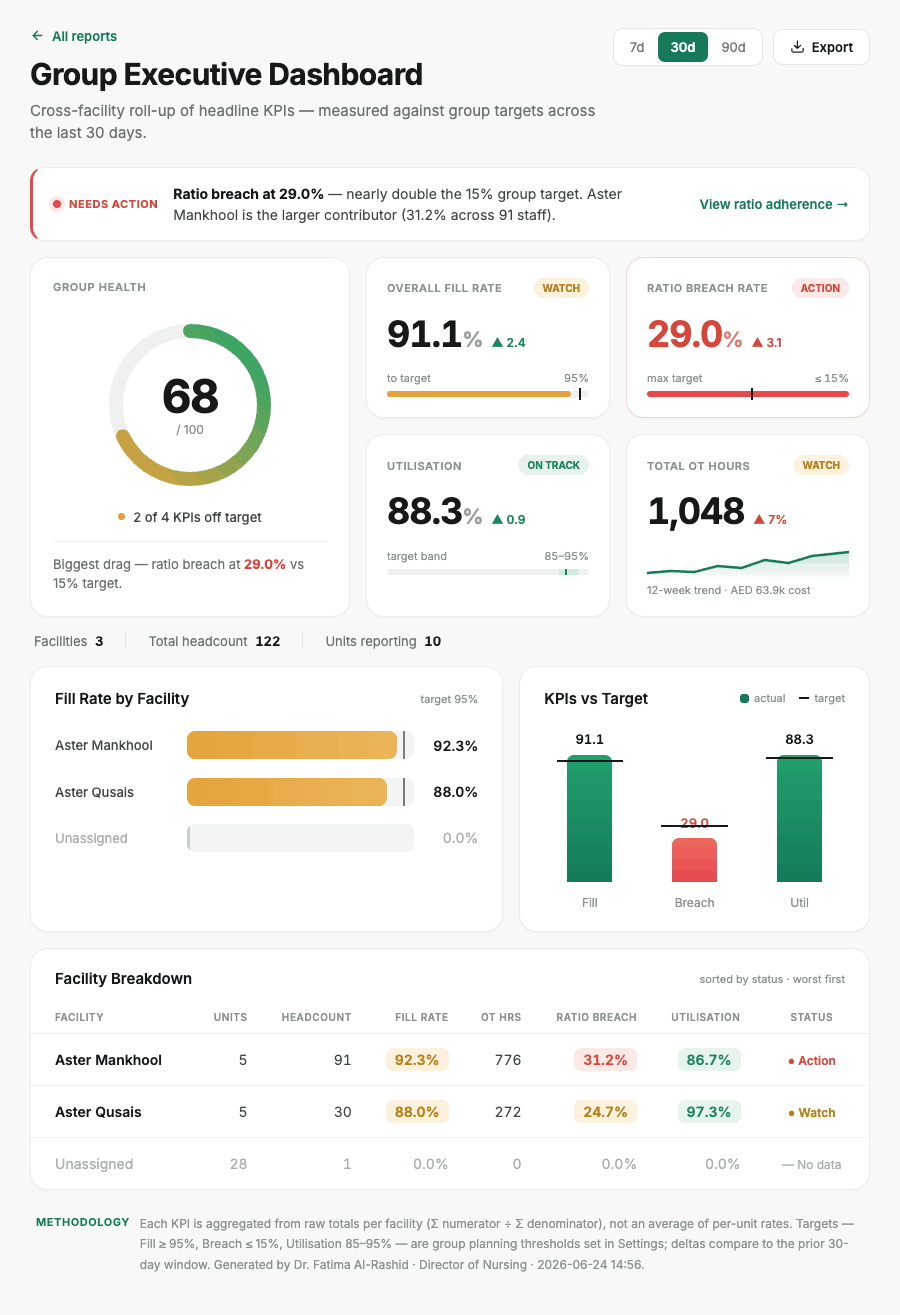
Leaders get live reports, and every action is recorded

26 reports for leadership and a tamper-evident log of every action.
  • 26 reports
  • Live alerts
  • Audit trail
Group executive dashboard report with fill rate, ratio breach rate, utilisation and overtime
Group Executive Dashboard
The AI engine

AI creates the roster, then a second safety check makes sure every shift follows the rules

Two tiers work together on every roster. You always get a roster: either complete, or with an itemised list of the slots that could not be filled and why.

01Input

What each shift needs and which nurses are available

Required nurses per shift, plus a de-identified picture of every eligible nurse.

02Tier 1 · AI model

AI suggests the best nurse for every shift

Azure AI Foundry in UAE North proposes assignments balancing six factors across the whole ward.

03Tier 2 · Rules engine

The safety check approves or rejects each shift

Every row faces the same gates as a manual assignment. Failing rows are dropped and logged; gaps are refilled from the eligible pool.

LicenceCertsCompetencyEligibility48h cap12h rest1 shift/dayLeaveGender
04Output

A safe roster, ready for your review

Ready for the charge nurse to review and publish, with every decision on the audit chain.

How the system chooses the best nurse for each shift

The rules engine ranks each eligible nurse with a transparent weighting. You can change the order in Settings → Assignment Priority. If the AI is unreachable, this engine builds the roster alone.

Competency
30%
Hours
20%
Rest
15%
Cost
15%
Fairness
10%
Preference
10%
Compliance

The system will not let anyone put a nurse on an unsafe shift

Before a nurse is placed on any shift, 9 safety checks run automatically. If one fails, the shift is refused and the reason is recorded.

LicenceCertsSkillShift48h12h rest1/dayLeaveGender
LALeila A.ICU · Night 14✓ Assigned
EREthan R.MED · Night 14✕ Blocked

Ethan's DHA licence expired. The assignment is refused and an audit row records why.

UAE Labour · Art. 17

Shorter working hours during Ramadan

Normal
48h
Ramadan
36h
UAE Labour · Art. 19

Daily limit on overtime

Shift+2hjustify
Over 2h a day needs a written reason
UAE Labour · Art. 29

Annual leave calculated automatically

30 days after 1 year of service
UAE Labour · Art. 31

Sick leave pay bands tracked

15 full30 half45 unpaid
90 days a year, three pay bands
Inside the product

See the real screens your nurses and managers will use every day

Real screens from the shipped application. Every view works on the same data, so a change in one place is reflected everywhere.

The monthly duty roster, created by AI

The view head nurses already print, generated by AI and checked by the rules engine. Hours total per nurse and on-duty counts per day.

  • Shift key with counts: Morning, 12h Morning, Night and second-area shifts
  • Leave, training and off days in the same grid
  • Export to the hospital's monthly duty-roster format
Real screen from the productClick to view full screen ↗

The roster grid where shifts are planned and edited

Board, Daily Grid, Weekly and Excel views over one dataset. Code Blue tags, split duty and holidays are first-class.

  • Overtime hours and shift totals per nurse
  • Modern, Dense and Timeline Excel modes
  • CSV round-trip including Code Blue and float sources
Real screen from the productClick to view full screen ↗

The daily sheet showing who works where on each shift

Area and bed allocation, role, function, break and reliever per nurse, with Callout, Swap and Overtime one click away.

  • Area cover chips show what is staffed: Triage, Resus, Observation
  • Charge nurse, team leader and DRN named on every shift
  • Exports to the Daily Assignment Sheet format
Real screen from the productClick to view full screen ↗

On-call nurses, support staff and head nurse sign-off

First and second on-call for day and night, HCAs and visual triage, and the head nurse sign-off that locks the sheet.

  • Reachable windows for each on-call nurse
  • Staff released for training shown separately
  • Day and night head nurse sign-off
Real screen from the productClick to view full screen ↗

Setting the staffing rules for each ward

Five steps per ward: identity, capacity, shifts and ratios, acuity and policy, certifications. Nurses needed is calculated live from census.

  • Patients per nurse and minimum nurses per shift
  • See the staffing cost of a change before saving
  • Clinical template presets per ward type
Real screen from the productClick to view full screen ↗

Staffing forecast for the next three days

Today, tomorrow and the day after: census, acuity, admits and discharges against assigned nurses, with every gap flagged.

  • Critical and Attention status per shift
  • Forecast accuracy tracked in its own report
  • Filter by unit, refresh on demand
Real screen from the productClick to view full screen ↗

Alerts that show what needs action right now

Act now, Needs attention today and Heads-up across hours, shortage, credential, leave and compliance alerts, each with a real lifecycle.

  • Acknowledge, resolve and reopen with role-gated writes
  • Bulk actions, filters and deep links
  • Thresholds you control
Real screen from the productClick to view full screen ↗

Which nurses are close to their hours limit

Every nurse's hours this week against the 48-hour cap and overtime this month against budget, with the warning marker at 90%.

  • Headroom, Watch and At-limit states
  • Consecutive days and rest gaps per nurse
  • Feeds the AI's hours factor directly
Real screen from the productClick to view full screen ↗

A live overview of staffing across the hospital

Fill rate, overtime rate, active nurses, alerts, float pool and units at risk, with real trends rather than decoration.

  • Current staffing status for every ward, right now
  • Today's callouts and who replaced them
  • Find a replacement from a ranked eligible list
Real screen from the productClick to view full screen ↗
Three care settings

Works for wards, operating theatres and outpatient clinics in one roster

Each is staffed from what really drives its demand.

RNRNRN
Inpatient wards

Wards: nurses based on the number of patients

1 nurse : 4 patients · from census & acuity
08:00CABGOR 2FA
10:30Lap choleOR 4LM
13:00Hip replaceOR 1SR
Operating Theatre

Operating theatre: nurses based on booked surgeries

Booked cases · nurse matched to procedure
Dr. Noor

Dr. Hadi

Dr. Amal

Outpatient clinics

Clinics: nurses based on doctors' clinic times

Clinic sessions · female-only enforced
Reports for nursing leadership

26 ready-made reports that show nursing leaders exactly what is happening

Each report answers one simple question about your nurses and wards. Pick a question below to see the real report.

Group Executive Dashboard
Click the report to view it full screen
More reports

15 more reports for hospital executives, regulators and HR teams

Real screens from the product. Click any report to see it full size.

Free pilot

See all 26 reports on your own hospital's data

Start a free 1-month pilot
Complete feature inventory

Everything NurseRoster AI can do today

Verified against the shipped application. Pick a module to see what your team can do with it.

Smart Roster: plan, check and publish shifts

The scheduling workspace. Four views over one dataset, with AI-assisted fill.

AI Auto-FillProposes assignments for a day, week or month; validated by the rules engine.
Auto-Fill diagnosticsUnfilled slots grouped by data, time or rejected-assignment cause.
Board, Daily Grid, Weekly viewsWard × shift grid with popovers; seven days across for pattern work.
Excel ViewModern, Dense (print parity) and Timeline (Gantt-style) modes.
Assign, swap, replace, add slotEvery manual action faces the same gates as the AI.
PublishLocks the roster and returns any advisory warnings.
Split duty & cross-department floatFirst-class segments and float sources.
Code Blue taggingTag responders on any shift.
Stale-config warningFlags when a published shift's requirement has drifted from ward config.
ExportsMonthly duty roster, Daily Assignment Sheets, CSV export and import.

Ward setup: staffing rules for each ward

Where the hospital's establishment is defined: the wards, what they run, and what they require.

Ward registerEvery ward with care setting and rostering model.
Shift Requirements gridRatio and minimum nurses per shift.
Required certification matrixCredentials each ward demands.
Charge-nurse requirementAt least two staff on every shift that needs a charge nurse.
Ward gender policyPlus male-staffing advisory.
Census & acuity submissionFeeds the demand calculation.
Impact previewSee required staffing move before saving a change.
Clinical template presetsReady-made configurations per ward type.
Audit trail per wardEvery change with old and new values.

Nurse profiles: skills, licences and contracts

A profile workspace per nurse, with six tabs: Personal, Competencies, Certifications, Skills, Schedule and Leave.

Competency matrixLevel 1–4 per unit.
CertificationsIssue and expiry dates, document upload, verification status.
Practising licenceAuthority and expiry for DHA, DoH or MOHAP.
Skills with lifecycle datesAcquired, last practised, recertification due.
Shift eligibilityWhich shifts each nurse may work.
Contract and costWeekly hours, hourly rate, employment type, hire and termination dates.
Float pool & OT competenciesFloat flag and procedures a nurse can scrub for.
OPD cluster membershipOne or more clinic clusters.
CSV bulk importLoad the registry in one step.

Certificates: who has what, and what is missing

Shows what is missing, not just what is held. A row is created for every credential a ward requires and a nurse does not have.

Three row sourcesHeld, required-but-missing and expired.
Two independent statusesValidity and HR verification.
Six KPI tilesIncluding how many nurses are actually fit to roster.
Two viewing modesBy certification, or by nurse with roll-up.
Verify and bulk verifyHR verification of uploaded documents.
Credential catalogueIssuing body, validity, scope and renewal route.
CSV exportThe full filtered register.

Leave: requests, approvals and balances

Calendar, Coverage, Requests, Balances and Insights, with live policy checks as dates are chosen.

Two-stage approvalFour eyes by identity: the same person cannot sign twice.
Coverage viewAnswers whether the shift will still be safe if leave is approved.
Required documentsA medical report blocks the final signature only.
EntitlementService-based, computed on every read (Art. 29).
Sick leave90 days in three pay bands (Art. 31).
Half days0.5 charged to entitlement, whole day blocked for rostering.
Leave typesAnnual, sick, maternity, emergency, unpaid, Iddah and more.
Policy windowsBlackout and notice rules per hospital.

Dashboard and alerts: live staffing status

The live view of every ward and a triage screen with real lifecycle.

KPI tiles with real trendsFill rate, overtime, nurses, alerts, float pool, units at risk.
Current staffing statusAssigned against required for every ward, right now.
72-hour forecastProjected staffing pressure for three days.
Callouts & find replacementRanked eligible list, assign in place.
Five alert categoriesHours, shortage, credential, leave and compliance.
Three severitiesAct now, Needs attention today, Heads-up.
Hours & overtime watchlistEvery nurse against cap and budget.
Acknowledge, resolve, reopenRole-gated, with bulk actions and thresholds.

Overtime: from claim to payroll

Hours worked past a rostered shift end, from claim to locked payroll line.

Records queueRaise, submit, approve or send back, in bulk.
Roster-resolved shift endsMeasured against the scheduled end, not a guess.
Two-stage approvalNamed approvers at each stage.
Art. 19 daily capWritten justification above two hours.
Fatigue flagPer-nurse over-cap watch.
Payroll exportWith re-export protection.
14 reason codesRendered from served policy.
One claim per nurse per dayEnforced against live claims.

Theatre and clinics: staffing by surgeries and sessions

Two care settings that are not ratio-driven, each staffed from its real source of demand.

Procedure catalogue & priority listsPriority-aware suggestion engine.
OT cases & roomsBooking schedule and room catalogue.
Surgeon repertoire & favouritesRanked preferred nurses who share the procedure.
Case-volume rosteringBypasses the ratio formula.
Clinic clusters & doctor registryOPD demand from doctor sessions.
Clinic schedule captureSessions drive staffing.
Split-duty & floatingAcross departments.
Female-only clinicsHard constraint everywhere.

Security, access and administration

The controls IT, HR and the regulator will ask about.

Role-based accessWard-scoped permissions.
Bilingual interfaceEnglish and Arabic with right-to-left layout.
Tamper-evident audit chainSHA-256 hash-chained log of every write.
Field-level encryptionAES-256-GCM on personal identifiers.
AI decision log & consentPer-nurse consent travels with the de-identified payload.
Secure sessionshttpOnly cookies, rotation and revocation.
Encrypted nightly backupsGPG-encrypted, key held outside the repository.
Command paletteKeyboard navigation to any ward, nurse or report.
SettingsScheduling rules, shift configuration, assignment priority, notifications, data, audit log.
Before & after

Before and After NurseRoster AI

Same department, same people. Far less done by hand.

● Before● After
Building the roster2–4 daysMinutes
Rule checksFrom memory9 automatic gates
Expired licenceFound afterBlocked before
Missing certificatesInvisibleFlagged per nurse
Approving leaveGuessworkShift impact shown
OvertimePaper notes2-stage approval
Answering a report1 weekLive · 26 reports
Audit evidenceNoneEvery action logged
Fits your operation

Built around how your hospital already works.

NurseRoster AI is shaped around your existing nursing operation: the same shift patterns, unit structure and chain of command. The workflow meets your current process. You don't change how you operate.

MM1N1SDMLAL

Uses the shift codes you already use

Configured exactly as your wards use them.

DAILY ASSIGNMENT SHEETSigned ✓

Prints the same sheets your teams sign today

Same format your teams sign today.

HNDoN✓

Follows your existing approval process

Two named approvers for leave and overtime.

CSV→NurseRoster←HL7

Imports the nurse data you already have

Start with CSV. HIS connector when ready.

Security & data residency

All your hospital data, including the AI, stays inside the UAE

Including the AI.

UAE North

The AI runs on servers inside the UAE

Azure AI Foundry, region checked on every request.

Fatima Al-RashidNurse #4821

The AI never sees nurse names or ID numbers

No names or IDs reach the model.

AES-256

Personal details are encrypted

Field-level encryption on personal data.

AI consent

Follows UAE data protection law (PDPL)

Per-nurse AI consent recorded.

#assignment.create · ICU · Night 14prev 9f3a…c21e → hash 4b7d…a90f
!assignment.reject · licence_expiredprev 4b7d…a90f → hash e12c…77b3
✓roster.publish · MED · Week 34prev e12c…77b3 → hash 0d85…3f6a

Every action is recorded and cannot be secretly changed

Every action linked by SHA-256. Walk a regulator through it.

Who it is for

How NurseRoster AI helps each person in your nursing team

Fill rate96%
Ratio breaches3
Licences due12
Overtime4.1%
Chief Nursing Officer

See staffing for every ward on one screen

  • Live fill rate & ratios
  • Licence risk early
  • Evidence for regulators
✓ Draft ready
Head & charge nurse

Check the roster instead of building it from scratch

  • AI drafts the month
  • Ranked callout cover
  • Print-ready sheets
OT · Sara K.AED 420
OT · Omar R.AED 310
Export to payroll ↓
HR, finance & IT

Overtime and leave ready for payroll, with full records

  • 2-stage OT approval
  • Leave per labour law
  • Costs in AED
FAQ

Questions Chief Nursing Officers usually ask first

What is NurseRoster AI?
NurseRoster AI is nurse scheduling and workforce-governance software for UAE and GCC hospitals. An AI model proposes the roster, a rules engine validates every assignment against licensing, rest, hours and ward policy, and 26 reports show nursing leadership fill rate, ratio adherence, overtime and compliance.
Does the AI roster the hospital on its own?
No. The AI proposes and optimises the roster; the rules engine checks every row; the charge nurse reviews, adjusts and publishes. If the AI is unavailable, the rules engine builds the roster alone, so you always get a roster.
How does it calculate how many nurses a shift needs?
For ratio-driven wards: required = MAX(ceil(census × acuity factor ÷ ratio), minimum nurses). Ratios and minimums are set per shift. Operating Theatre uses booked cases and OPD uses doctors' clinic sessions instead.
Is it compliant with UAE labour law?
The engine enforces Federal Decree-Law 33/2021: Ramadan's 12-hour weekly reduction (Art. 17), the overtime daily cap with written justification (Art. 19), annual leave (Art. 29) and the three-band sick-leave ladder (Art. 31). Licences from DHA, DoH and MOHAP are checked on every assignment.
Where is our data stored, and does the AI see patient or nurse identities?
Application, database and AI inference are hosted in-country, with AI on Azure AI Foundry in UAE North. Personal identifiers are encrypted at field level and removed before any data reaches the model. Per-nurse AI consent is recorded.
Do we need to replace our HIS?
No. Start with CSV import of wards and nurses. An HL7v2 ADT connector is built and ready to be wired to your HIS for live census.
Is there an Arabic interface?
Yes. The full interface is available in English and Arabic, with right-to-left layout.
Which hospitals is NurseRoster AI built for?
Hospitals and hospital groups in the UAE and the wider GCC. It checks nursing licences from DHA, DoH Abu Dhabi and MOHAP, follows UAE Federal Decree-Law 33/2021 on working hours and leave, and runs its AI inside the UAE.
How does the AI decide which nurse goes on which shift?
Every eligible nurse is scored for every shift on six factors: competency for the ward (30%), hours already worked (20%), rest since the last shift (15%), cost (15%), fair share of shifts (10%) and personal preference (10%). Nurses who fail any of the 9 safety checks are never considered.
What happens when a nurse calls in sick?
The charge nurse records the callout and the system shows a ranked list of nurses who are qualified, rested and under their hours limit for that shift. The replacement is assigned in a few clicks and the change is recorded.
Does it check nursing licences and certificates?
Yes. A nurse with an expired DHA, DoH or MOHAP licence cannot be put on a shift. Licences and certificates that are about to expire raise alerts in advance, and the certificate register shows every certificate a ward requires that a nurse does not have.
Can it roster operating theatres and outpatient clinics?
Yes. Wards are staffed by patient numbers and nurse-to-patient ratio, operating theatres by the list of booked surgeries, and outpatient clinics by doctors' clinic sessions. All three sit in one roster, with split duties and floating between departments.
Can head nurses still change the roster themselves?
Yes. The charge nurse can assign, swap, add shifts, float staff and tag Code Blue responders before publishing. Every manual change goes through the same 9 safety checks as the AI, so a manual edit cannot create an unsafe shift.
Are shifts shared fairly between nurses?
Fairness is one of the six factors the AI uses, so nights, weekends and hours are spread across the team. The Per-Nurse Hours & Fairness and Weekend & Night Equity reports show leaders whether the same few nurses are carrying the load.
How is overtime approved and sent to payroll?
Overtime is claimed against the nurse's rostered shift end, then approved in two stages by named approvers. More than two hours in a day needs a written reason under Article 19. Approved overtime is exported to payroll, with protection against paying the same claim twice.
What reports does a Chief Nursing Officer get?
26 ready-made reports, including Group Executive Dashboard, Fill Rate Trend, Patient-to-Nurse Ratio Adherence, Shift Coverage Gaps, License Expiry Pipeline, Overtime & Agency Spend, Ramadan Hours Compliance, Rest & Consecutive Shifts and 72-Hour Forecast Hit Rate. Each report explains how it is calculated and can be exported.
What do we need to get started?
A list of your wards with their shift patterns and nurse-to-patient ratios, and your nurse list with grades, licences and certificates. Both can be imported from spreadsheets (CSV). A live connection to your hospital information system can be added later.
What does the free pilot include?
One nursing unit, live for one month, free. Our team configures the ward, imports your nurses and trains your head nurse. You keep the reports and decide afterwards whether to roll out.
Free 1-month pilot

Run NurseRoster AI on your unit, free for one month.

We set it up with your wards and nurses. You run it live for 30 days.

No licence feeSetup includedNo commitment


    We reply within one business day.

    Free 1-month pilotOne unit · setup includedStart